Over the last few lessons, several big ideas have been building on each other. We learned to know who we're talking to, to build connection points instead of brochures, to keep things current by sharing ownership, and to always talk value. Today we're going to bring those threads together into one clear picture.
Here's the big idea: your website shouldn't stand on its own. It should be woven into every ministry of your church.
And there's an important piece we haven't talked about much yet. So far, a lot of this course has focused on newcomers, and for good reason. But your website is also one of the most useful tools you have for serving the people who are already part of your church family. A website that's truly part of your ministries engages both: the community around you and the people who sit in your pews every week.
Standalone vs. Woven In
A standalone website lives off to the side of church life. Someone built it, it sits there, and the church carries on with its ministries as if the website didn't exist. Announcements happen from the pulpit and in the bulletin. Sign-ups happen on paper in the lobby. Sermon notes stay in the pastor's folder. The website is a separate thing that occasionally gets updated when someone remembers.
A woven-in website is different. It's part of how ministry actually happens. When the pastor announces a new class, people sign up on the website. When the youth pastor plans a retreat, the permission forms are online. When someone needs prayer at 11 PM, the website is where they reach out. When members want to revisit Sunday's message, it's waiting for them there.
Here's a simple way to tell the difference. Ask your team: "If our website disappeared tomorrow, would any of our ministries notice?"
If the answer is no, your website is standing alone.
If the answer is "Yes, we'd be lost!", your website is woven in.
The goal of this lesson is to move your website from the first answer to the second, so it becomes a real tool that your ministries depend on and your people use every week.
Two Audiences, One Website
A woven-in website serves two groups of people at the same time:
Your community: neighbors, newcomers, people searching for help or hope, families looking for something for their kids, and anyone curious about faith.
Your church family: members and regular attenders who want to stay connected, grow in their faith, serve, and keep up with what's happening.
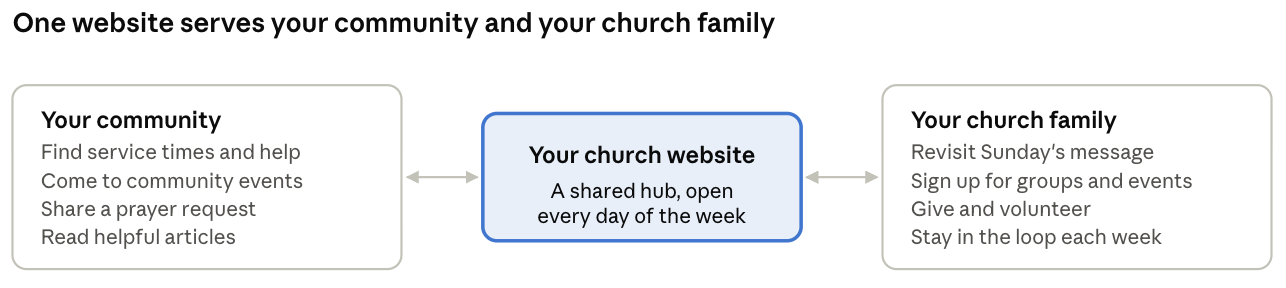
These two groups need different things, but they're connected. When your church family uses the website regularly, they keep it alive and current, which makes it more inviting to newcomers. And when newcomers find a website full of active ministry, they can see a church family they might want to join.
A helpful way to organize your site with both groups in mind is to keep newcomer-focused pages (like the Visitor's Page and About page) easy to find from the home page, while making member-focused tools (like sign-ups, giving, and sermon archives) just a tap away in the main menu. Many churches add a simple "Get Involved" or "Connect" section to pull the member tools together.
Engaging Your Community
When your website is part of your ministries, it becomes a way to serve your whole community, not just to invite people to Sunday services. Many people in your town may never walk into a worship service at first, but they might show up for a community meal, a parenting class, or a food pantry. Your website can be the bridge.
Here are some ways to engage your community online:
Share how you serve. Highlight your food pantry, clothing closet, tutoring program, or community dinners, with clear details on how neighbors can receive help or get involved.
Promote community-friendly events. Trunk-or-treat, summer concerts, holiday services, and family fun days are natural first steps for people who aren't ready for a Sunday service.
Offer help for real needs. Grief support, recovery groups, marriage classes, and financial courses meet people right where they are. Make them easy to find.
Invite prayer. A simple prayer request form tells your community that your church cares, whether or not they attend.
Provide helpful content. Blog posts and sermons that speak to everyday struggles can reach people who are searching online for answers (remember Lesson 13).
Show your local partnerships. If you partner with a school, shelter, or community organization, say so. It shows your church is invested in your town.
Each of these is a ministry in its own right, and the website is how your community discovers it.
Engaging Your Attendees
It's easy to think that once someone is part of the church, they don't need the website anymore. But the opposite is true. Your regular attenders and members can be your website's most frequent visitors, if it gives them a reason to come back.
Think about the week between Sundays. Your church family is busy with work, school, and family. The website can help them stay connected to church life all week long. Here are some ways to serve them well:
Extend Sunday's message. Post each sermon with a short summary, a Scripture reference, and a few questions for families or small groups to discuss during the week.
Make sign-ups easy. Classes, retreats, mission trips, meal trains, Vacation Bible School, and volunteer teams can all be handled with simple online forms instead of clipboards in the lobby.
Simplify giving. A clear, easy giving page lets members give regularly and explains where gifts go.
Help people find their next step. Show members clear ways to grow: joining a small group, taking a class, serving on a team, or exploring baptism or membership.
Keep a calendar people can trust. A current, easy-to-read calendar helps families plan their week around church life.
Offer resources. Devotionals, reading plans, parenting tips, and kids' activity pages help members grow at home.
Share stories of what God is doing. Baptisms, mission trip updates, answered prayers, and ministry milestones encourage your church family and remind everyone that their church is alive and active.
When members use the website regularly, something good happens: they start sharing it. A member who loved Sunday's sermon sends the link to a friend. A parent forwards the VBS sign-up to a neighbor. Your church family becomes the bridge between the website and the community.
Weaving the Website Into Each Ministry
The most practical way to make your website part of your ministries is to look at each ministry, one at a time, and ask: "How could the website help this ministry do its work?"
Here are some examples to spark ideas:
You don't have to do all of this at once. Pick one or two ministries to start with, ideally those that would benefit most, and help them use the website well. As other ministries see the results, they'll want to join in.
When each ministry relies on the website, each ministry leader has a reason to keep their part current. Ownership becomes natural instead of forced.
Make the Website the Hub People Return To
A website only becomes part of church life if people actually use it. That means regularly pointing people to it, from every part of your church's communication, until visiting the website becomes a natural habit.
Here are some simple ways to do that:
Mention it from the front. During announcements, say "You'll find all the details and the sign-up on our website." Then make sure they really are there.
Use QR codes. Add a QR code to your bulletin, slides, and posters that takes people straight to the right page, like the event sign-up or the digital connection card.
Link to it everywhere. Your newsletter, social media posts, and church emails should link back to the website for details, rather than repeating everything in each place.
Keep the website as the source of truth. If an event time changes, update the website first. When people learn that the website is always right, they trust it and return to it.
Teach people how to use it. Some members, especially older ones, may need a little help. A short demo during a fellowship time or a simple handout can make a big difference.
Celebrate what happens online. Share stories like "Twelve families signed up for VBS online this week!" or "Someone found our grief group through our website." It reinforces that the website is part of the church's ministry.
Over time, your website stops being a separate project and becomes the place where your church family connects, your ministries organize, and your community discovers who you are. That's exactly what we've been working toward throughout this course.
Your Five Action Steps for This Lesson
Ask the "disappear" question. With your staff or leadership team, ask: "If our website disappeared tomorrow, which ministries would notice?" Write down the answers honestly.
Pick two ministries to weave in. Choose two ministries that would benefit most from the website, and meet with their leaders to decide one or two specific ways the website can help them this season.
Add one member-focused tool. Add or improve one thing your church family will use weekly, such as sermon discussion questions, an online sign-up, or a clear giving page.
Add one community-focused connection point. Highlight one way your church serves the community, like a food pantry, support group, or community event, with clear details on how to get involved.
Point people to the website for a month. For the next four weeks, make sure every announcement, bulletin, and social post sends people to the website for details, and add QR codes where it helps.