So far in this section we've built a home page that opens the door and an About page that helps people get to know you. Today we're building what may be the most important page for growing your church: the Visitor's Page. You might call it Plan a Visit, I'm New, or First Time Here? The name matters less than what it does.
Think about what it takes for someone to visit a church for the first time. For many people, it's a big step. They may not have been inside a church in years, or ever. They might be walking through a hard season. They're wondering what to wear, where to park, what to do with their kids, and whether everyone will stare at them. A lot of people quietly decide not to visit simply because they can't picture what will happen.
Your Visitor's Page exists to take those worries away, one by one, before they ever pull into your parking lot. And to do that well, we need to think about this page a little differently than most churches do.
Process Thinking, Not Program Thinking
Most church websites are organized around programs. There's a page for the choir, a page for women's ministry, a page for youth group, a page for Wednesday night supper. That makes sense to the people who run those programs. It's how the church is organized on the inside.
But a visitor doesn't experience your church as a list of programs. They experience it as a process, a series of steps they walk through, one after another. First they find you. Then they decide whether to come. Then they drive in, park, find the door, get their kids settled, sit through a service, and decide whether to come back.
Program thinking asks, "What do we offer?"
Process thinking asks, "What is this person experiencing right now, and what do they need for the next step?"
Here's how the two approaches look on a Visitor's Page:
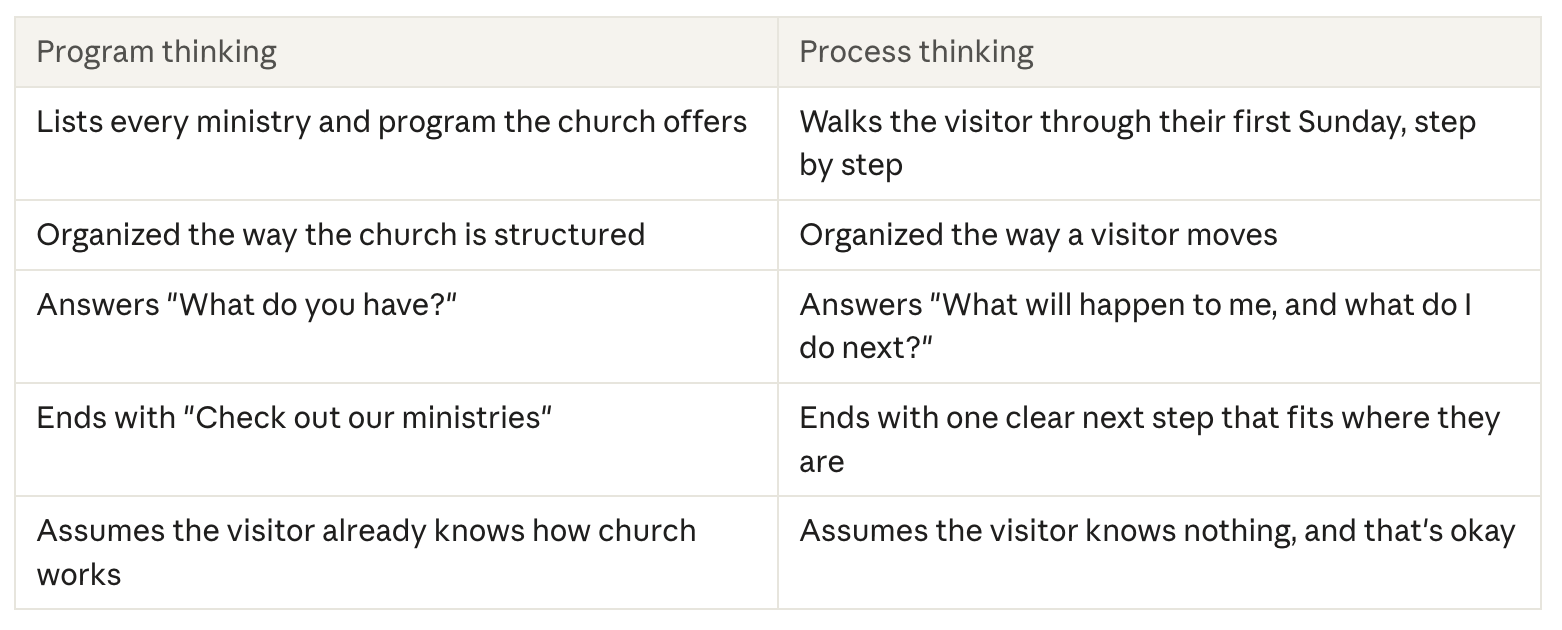
Programs still matter. A family with teenagers will want to know about youth group eventually. But on the Visitor's Page, programs come in only when they answer a question the visitor has at that moment, like "Where do my kids go?" The page follows the person, not the org chart.
The Visitor's Journey
If a Visitor's Page follows the person, then the first step is to picture that person's path. Most first-time visits move through four stages, and at each stage the visitor carries a few quiet questions.
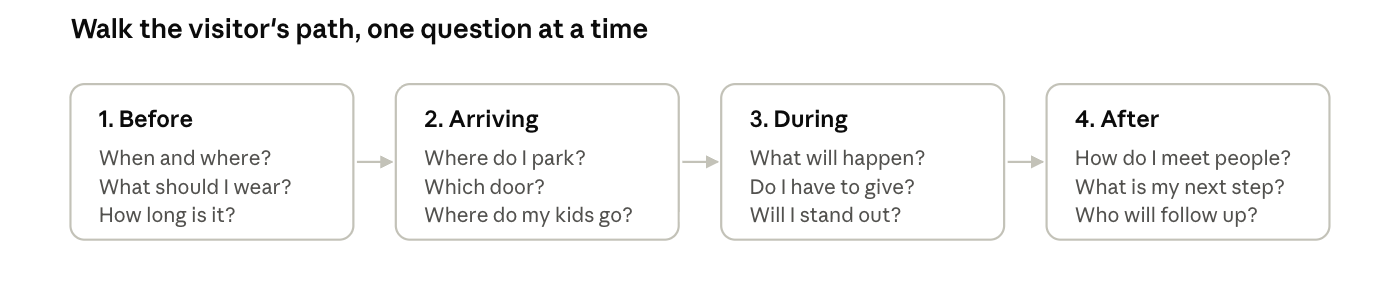
A great Visitor's Page is simply the answers to those questions, in that order. If you build the page by walking through these four stages, you'll naturally cover what matters and leave out what doesn't.
A helpful way to do this is to actually walk the path yourself. Next Sunday, pretend you've never been to your church. Drive in from the main road, look for a parking spot, find the entrance, and notice every moment where a newcomer might feel unsure. Each of those moments is something your Visitor's Page should explain.
What Visitors Need to Know at Each Step
Let's walk the path together and fill in what your page should say at each stage.
1. Before they come
When and where. Service times, the full address, and a tap-to-map link. If you have more than one service, briefly explain the difference, like 8:30 is a quieter traditional service; 10:30 has a band and kids' programs.
What to wear. Be specific and reassuring: You'll see everything from jeans to suits. Come as you are.
How long it lasts. Our service runs about 75 minutes. This one small detail eases a lot of anxiety.
Accessibility. Mention wheelchair access, elevators, hearing assistance, large-print materials, or anything else that helps.
A face to look for. A photo of your pastor or a greeter with a note like Look for Sarah at the welcome table gives visitors someone to connect with.
2. When they arrive
Where to park. Point out the lot, any reserved visitor parking, and street parking options.
Which door to use. A photo of your main entrance is incredibly helpful, especially if your building has several doors.
What happens inside. A greeter will meet you at the door, and there's coffee in the lobby.
Where kids go. Explain check-in, age groups, and safety. Parents want to know their kids will be safe, that volunteers are screened, and how they'll be contacted if needed. If kids stay with parents in the service, say so, and mention anything provided for them.
3. During the service
What the service is like. Briefly describe the flow: music, prayer, a message, and anything else that's part of your worship. Mention the style of music.
Practices that might be unfamiliar. If you take communion, explain how it works and who's welcome to participate. If people stand, kneel, or respond aloud, a simple note helps.
Giving. Reassure guests: Please don't feel any pressure to give. You're our guest.
No spotlight. Many visitors fear being asked to stand up or introduce themselves. If you don't do that, say so: We won't single you out.
4. After the service
How to connect. Mention a welcome table, coffee time, or a newcomers' gift.
One next step. Offer a single, simple next step, like filling out a connection card, joining a newcomers' lunch, or meeting the pastor.
What follow-up looks like. Be honest and low-pressure: If you leave your email, the pastor will send a short thank-you note. That's it.
Making the Page Easy to Use
You now know what to say. Here's how to present it so it actually helps.
Follow the journey from top to bottom. Organize the page in the same order as the four stages: before, arriving, during, after. Visitors can scroll through their first Sunday before it happens.
Use questions as headings. Headings like What should I wear? and Where do my kids go? match exactly what people are wondering, and they're easy to scan on a phone.
Show, don't just tell. Photos of your entrance, your welcome table, your kids' area, and real people in your lobby help visitors picture themselves there.
Add a short welcome video. A one- or two-minute video of your pastor saying hello and walking from the parking lot to the front door can be one of the most reassuring things on your whole website. It doesn't need to be fancy; a steady phone is fine.
Keep the tone warm and honest. Write like you're talking to a nervous friend. Don't oversell, and don't describe anything that isn't true on a typical Sunday.
Consider an optional "Plan Your Visit" form. Some churches let visitors share their name, the date they plan to come, and how many kids they're bringing, so a greeter can meet them and kids' check-in can be ready. Keep it short, make it clearly optional, and only offer it if your team will truly follow through.
Link to it from everywhere. Your home page button, your main menu, your social media profiles, and your Google listing should all point to this page.
Connecting the Page to What Happens After
Here's where process thinking really pays off. A Visitor's Page isn't just a page. It's the first step in a process that continues long after someone closes their web browser.
Think about what happens when someone fills out your Plan Your Visit form or leaves their email on a connection card. Who receives it? What happens next? How quickly? If the honest answer is "It goes to an inbox no one checks," then the page has made a promise the church can't keep.
Before you publish your Visitor's Page, walk through the whole process with your team:
Someone plans a visit online. Who is notified, and how?
They arrive on Sunday. Is a greeter ready to meet them by name? Is kids' check-in prepared?
They leave. Who sends a thank-you note, and within how many days?
They come back, or they don't. What is the next simple invitation, and who extends it?
And remember: the page should only promise what your church actually does. If you say Someone will meet you at the door, make sure someone will.
Your Five Action Steps for This Lesson
Walk the path like a first-time guest. Next Sunday, arrive as if you've never been there. Note every moment of uncertainty, from the main road to the parking lot, the door, the kids' area, the service, and the exit.
Write the answers to the four-stage questions. Using the drawing in this lesson, write a short, honest answer to each question for your church. These answers become the heart of your Visitor's Page.
Take visitor-focused photos. Photograph your main entrance, parking area, welcome table, and kids' check-in so visitors can picture each step.
Map your follow-up process. Meet with your pastor and welcome team to decide who receives visitor forms, who greets planned visitors, and who follows up, with a clear timeline for each.
Test it with a real newcomer. Ask someone who started attending recently to read your draft Visitor's Page and tell you what they wish they'd known before their first visit.