Both/And, Not Either/Or
In the last lesson, you set up a system for tracking growth and measuring whether your process is working. Now let's talk about where your process lives. Today, the answer has to be two places at once: in person and online.
Think about how people find and connect with a church now. Many first-time guests have looked at your website, and often watched a sermon online, before they ever walk through your doors. Many of your members check in on church life from their phones during the week. Some people can't make it in person for a season because of health, work, or travel. If your process only exists inside your building, a big part of people's lives is left out.
But the answer isn't to move everything online either. Growth happens best in real relationships with real people. Screens can connect, inform, and encourage, but they can't replace a hug, a shared meal, or someone sitting beside you in a hospital waiting room.
The apostle Paul understood both. Much of the New Testament is made up of letters — the long-distance tools of his day — that taught and encouraged churches he couldn't visit. But he always longed to be with people in person. John felt the same way: "Having many things to write unto you, I would not write with paper and ink: but I trust to come unto you, and speak face to face, that our joy may be full" (2 John 1:12, KJV).
That's our model: use every tool available to reach and help people, while always pointing them toward face-to-face relationships. As Paul put it, "I am made all things to all men, that I might by all means save some" (1 Corinthians 9:22, KJV).
In-Person Ideas
In-person connection is the heart of your process. It's where trust is built and lives are changed. Here are some ideas for strengthening the in-person side of each stage:
Warm welcome teams. Greeters, a welcome center, and a reserved parking spot for guests make a strong first impression.
Newcomers' gatherings. A monthly lunch or dessert with the pastor gives guests a relaxed way to ask questions and meet people.
Home small groups. Living rooms and kitchen tables are some of the best places for people to grow.
Mentoring pairs. Coffee, a walk, or lunch with a guide creates a personal space for next-step conversations.
Hands-on serving. Serving teams, community projects, and mission trips help people use their gifts side by side.
Celebration moments. Baptisms, commissioning services, and testimony Sundays mark checkpoints in front of the whole church family.
Life-on-life moments. Hospital visits, meals for new parents, and showing up at a ball game build the kind of trust that keeps people moving forward.
Digital Ideas
Digital tools extend your process beyond your building and beyond Sunday. They help people take steps from wherever they are. Here are some ideas:
Online connection card. Let guests and members share their information, prayer requests, and interest in a next step from their phone.
Sermons and livestreams. Post every message online so people can catch up when they miss, and so curious guests can get a feel for your church before they visit.
Short pathway videos. Create a two- or three-minute video for each stage that explains what it is and what the next step looks like.
Online classes. Offer your newcomers' class or spiritual gifts class online or on demand.
Group texts and chat apps. Help small groups and serving teams stay connected during the week.
Email and text follow-up. Send a welcome series to new guests and short encouragement messages to people who just reached a checkpoint.
Digital devotionals and reading plans. Share daily Scripture readings or a weekly devotional tied to Sunday's message.
Social media stories. Share real stories of people taking next steps to celebrate growth and invite others.
Online sign-ups. Let people sign up for groups, classes, serving teams, and next-step conversations with a few taps.
Side by Side: Each Stage, Both Ways
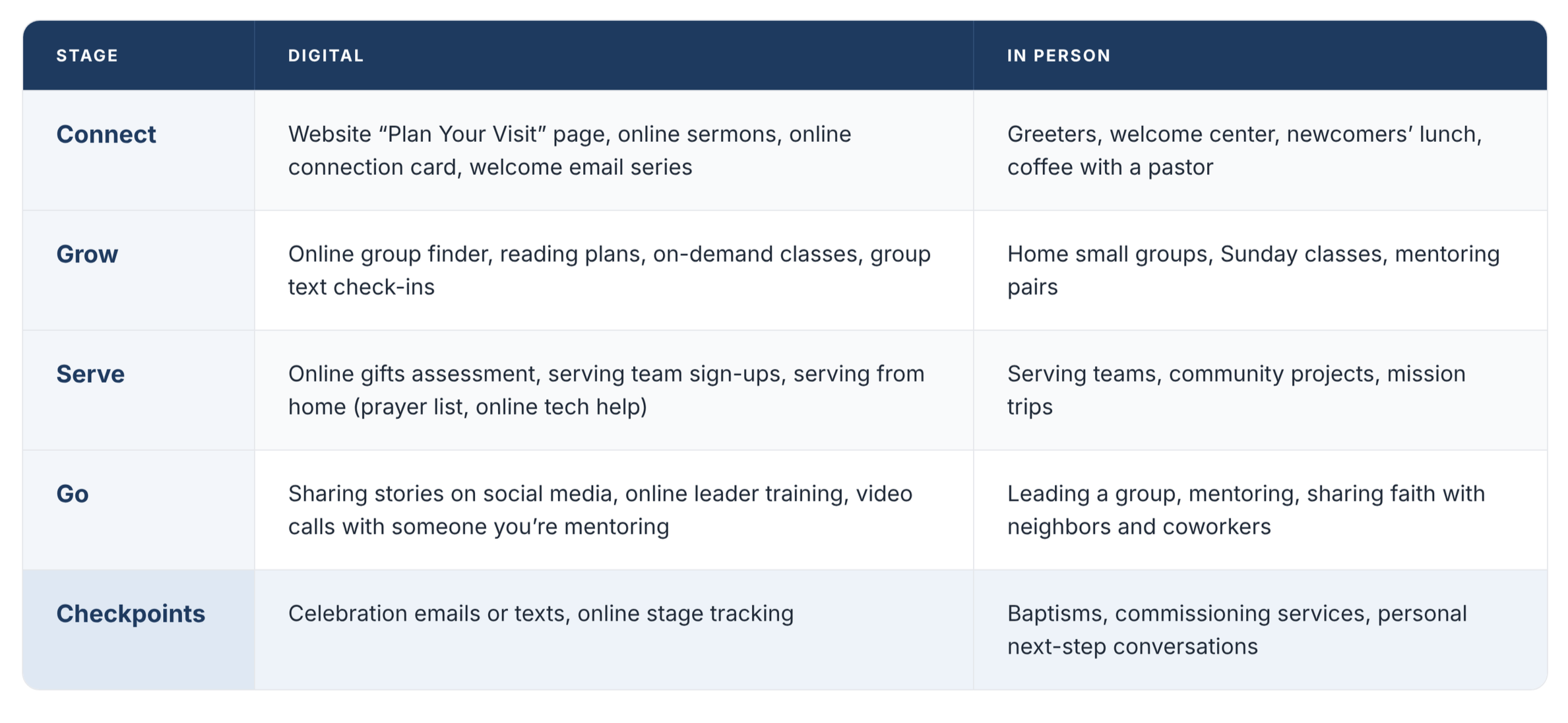
Here's how the in-person and digital pieces can work together at each stage, using the Connect, Grow, Serve, Go stages. Notice that the digital option usually opens a door, and the in-person option walks people through it.
Your Website: The Front Door Before the Front Door
For many people, your website is the first place they ever meet your church. Long before they shake a greeter's hand, they've already formed an impression from your homepage. That makes your website one of the most important connection points in your entire process.
In a program church, the website usually looks like a bulletin board: a long list of ministries, events, and calendars. In a process church, the website works like a guide. It shows people the path and helps them take their very first step.
Here are some ways to turn your website into a connection point:
Make "Next Steps" impossible to miss. Put a clear "Next Steps" or "Get Connected" button at the top of every page.
Show your pathway. Include a simple graphic of your stages so people can see how growth works at your church.
Create a "Plan Your Visit" page. Tell guests what to expect: service times, parking, what to wear, what happens with their kids, and how long the service lasts. Offer to have someone meet them at the door.
Organize by stage, not by program. Instead of listing every ministry, group them under your stages with a short note about which next step each one helps people take.
Add an online connection card. Make it easy for people to say, "I'm new," "I'd like to talk to someone," or "I'm ready for a next step."
Share real stories. Short written or video stories of people who've taken steps help visitors picture themselves on the path.
Put a real person behind it. Include photos and names of the people who will follow up. People are more likely to reach out to someone they can picture.
Keep it current and mobile-friendly. Many visitors will view your site on a phone. An outdated calendar or a hard-to-read page sends a message too.
Bridging Digital and In Person
The real power comes when digital and in-person work together. The goal isn't two separate processes. It's one process with many doors. Here are a few rules to keep them connected:
Every click should lead to a person. When someone fills out a form or signs up online, a real person should reach out within 48 hours. Digital starts the conversation; people continue it.
Use digital to prepare, in person to connect. Send a short video before a newcomers' lunch so guests know what to expect, then welcome them warmly in person.
Use in person to launch, digital to sustain. Start a small group face to face, then use a group text to keep people connected between meetings.
Track both the same way. A step taken online counts just as much as one taken in person. Record both in your tracking system from Lesson 19.
Use the same language everywhere. Your stage names, checkpoints, and next steps should look and sound the same on your website, on social media, and from the pulpit.
Don't let online become a hiding place. Watching online is a great first step, but always gently invite people toward real relationships.
Action Steps
Before you move on to the next lesson, work through these on your own or with your team:
Read 2 John 1:12 and 1 Corinthians 9:19–23. Reflect on how the early church used every tool available while still valuing face-to-face relationships.
Do the website checklist. Go through each question honestly. Better yet, ask someone who has never been to your church to look at your website and tell you what they notice.
Build a "Next Steps" page. Create or update one page on your website that shows your pathway and gives a clear next step for each stage.
Add an online connection card. If you don't have one, set one up and decide who responds to it within 48 hours.
Fill in your side-by-side chart. For each stage, list at least one digital and one in-person option.
Create one pathway video. Record a short, simple video explaining your stages and how to take a first step. A phone camera is fine.
Connect one digital step to a person. Pick one online form or sign-up and make sure it always triggers a personal follow-up.
Share one story online. With permission, share the story of someone who took a next step on your website or social media.
When your process works both online and in person, more people can find it, and more people can keep moving forward. See you in the next lesson!